Ultralytics YOLO on D-Robotics RDK: Benchmarks and Real-World Robots
D-Robotics, as a proud partner, was present at Ultralytics YOLO Vision 2026. We shared stories and benchmarks from global makers deploying Ultralytics YOLO on real-world robots with D-Robotics RDK, and demonstrated Ultralytics YOLO models running locally on RDK.
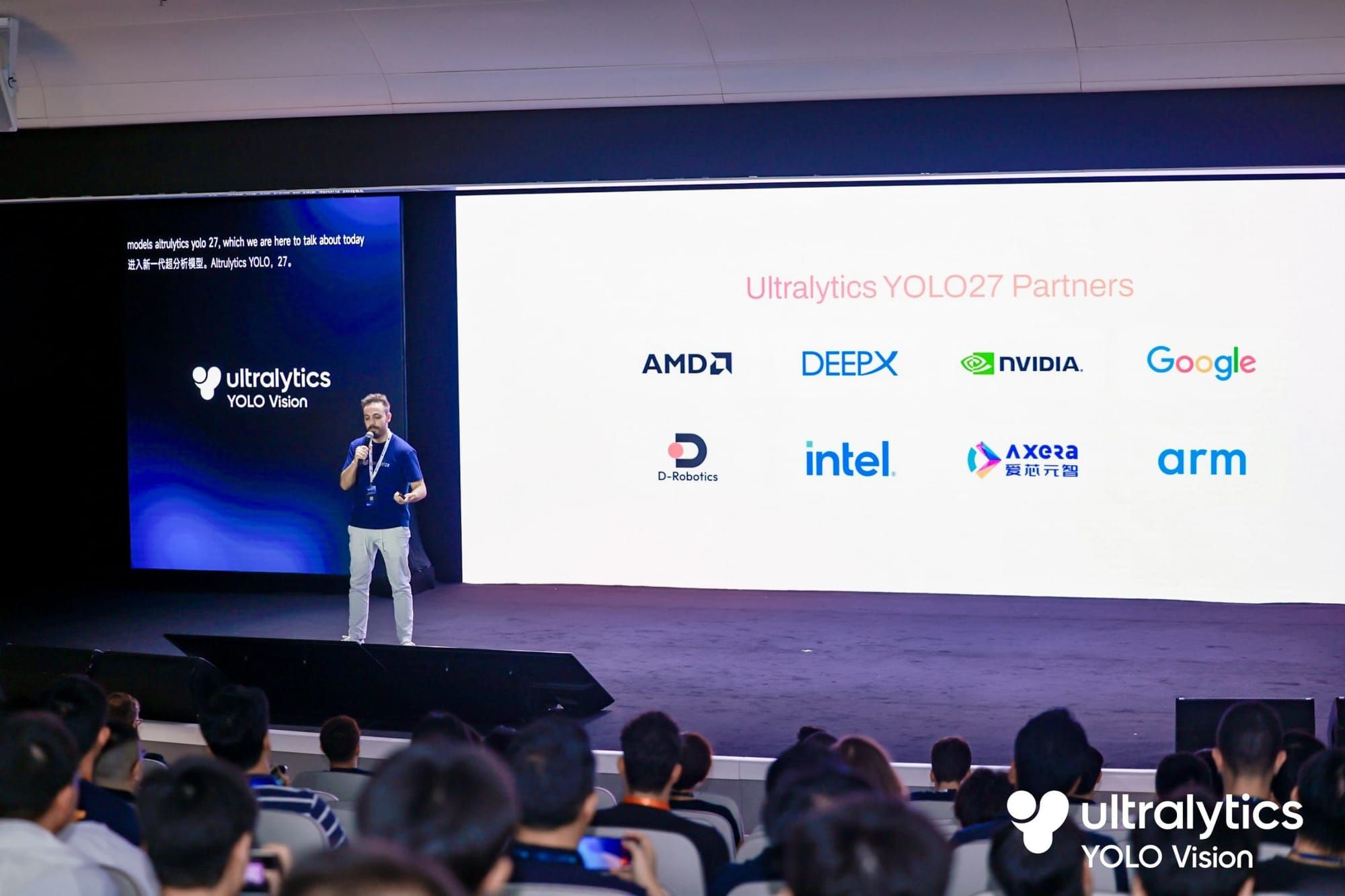
On September 13, Ultralytics YOLO Vision 2026 brought the global computer vision community together in Shenzhen and online under the theme “Open vision, built for the real world.” The event connected major announcements, including Ultralytics YOLO27, with sessions and demonstrations focused on deploying vision AI in robotics and other real-world systems.
As an event sponsor and official Ultralytics YOLO27 Partner, we contributed a robotics perspective. Our team presented stories and benchmarks from global makers deploying Ultralytics YOLO on real-world robots with D-Robotics RDK. At our booth, we also demonstrated Ultralytics YOLO models running locally on the BPUs of RDK X5 and RDK S100P after platform-specific conversion and compilation.
Looking back, one message stood out: model speed matters, but a useful robot depends on the complete perception-to-action path. The sections that follow explain how the RDK hardware and software stack supports that path, how to interpret our BPU benchmarks, and what three working robots reveal about practical edge vision design.
How Ultralytics YOLO and D-Robotics RDK Work Together
The relationship becomes clearer when we separate the model’s perception role from the RDK platform’s execution and integration responsibilities, then follow the deployment path into ROS 2.
What YOLO Adds to a Robot’s Perception Stack
Ultralytics YOLO turns images into structured information a robot can use, including object classes and boxes, segmentation masks, pose keypoints, or image classifications. A navigation node can recognize an obstacle category, while an interaction node can use pose keypoints to respond to a gesture.YOLO is therefore one part of the robot, not the entire intelligence stack. Localization, motion planning, motor control, safety logic, speech, and user interfaces still need their own components.
How the RDK BPU Runs Vision Models on the Robot
RDK platforms combine general-purpose processors with our BPU, a dedicated AI computing unit for on-device inference. In the RDK YOLO pipelines described here, the BPU accelerates the compiled neural network, while the CPU handles pre- and post-processing, including output decoding and NMS for YOLO11 detection. The CPU also runs application logic, ROS 2 nodes, and communications. Higher-end RDK platforms also add MCU resources for real-time control.Ultralytics provides the YOLO model family. We provide the RDK hardware, BPU runtime, model deployment tools, reference models, and robotics integration resources. Our current RDK Model Zoo covers the workflow from an original PyTorch or ONNX model through quantization, BPU execution, post-processing, and example verification.
From a Trained Model to a ROS 2 Perception Node
A typical deployment has six stages:
- Select a supported pretrained model or train a custom YOLO model.
- Export the model using the target platform’s supported export procedure, with an output layout that matches the deployment sample’s post-processing.
- Quantize and compile it into the platform-specific BPU artifact, such as
.binor.hbm. - Prepare the camera input in the format and resolution expected by the model.
- Run inference and apply task-specific post-processing, including decoding, confidence filtering, NMS, and coordinate mapping for YOLO11 detection.
- Publish those results to the rest of the robot through an application interface or a ROS 2 node.
Developers can start from precompiled models and Python or C++ samples. Our TogetheROS.Bot YOLO documentation shows how camera images enter a BPU inference node and detection messages reach downstream nodes. Coverage varies by board, operating-system release, and repository branch, so check the current target-platform documentation.
Why Run Ultralytics YOLO on the Robot Instead of in the Cloud?
Keeping perception close to the sensors changes more than the location of inference. It affects the response path, connectivity requirements, and how vision shares work with control software and larger models.
A Shorter Perception-to-Action Path
When the camera, inference engine, and control software are on the same robot, the system does not need to upload every frame and wait for a remote response. That can shorten the path from seeing an object or gesture to choosing an action. The actual response time still depends on capture, decoding, preprocessing, model size, post-processing, ROS 2 communication, and control logic. BPU inference is only one part of that path.
Operation With Limited Connectivity
On-device vision can keep essential perception available when a network is slow, intermittent, or unavailable. Whether any data leaves the robot remains an application-level design choice; local inference alone does not define the complete system’s privacy behavior.
Coordinating Vision With Control and Larger Models
Running YOLO at the edge also supports a practical division of labor. A compact detection model can watch the camera continuously, while a larger vision-language model runs only when YOLO finds a relevant target. The BPU can handle vision inference, the CPU can run orchestration or language components, and an MCU or external controller can manage time-sensitive motion. This layered approach appears repeatedly in the robot projects below.
Which RDK Platform Fits Your Ultralytics YOLO Workload?
The right platform depends on the model, input resolution, number of cameras, concurrency, memory needs, control requirements, and the rest of the application. TOPS describes advertised AI computing capacity; it does not predict complete robot FPS by itself.
Platform | Advertised AI Performance | Best-Fit Starting Point | Official Resource |
RDK X5 | 10 TOPS | Makers, education, single-robot prototypes, camera perception, and ROS 2 development | |
RDK S100 | 80 TOPS | Higher-throughput perception and heterogeneous perception-decision-control systems | |
RDK S100P | 128 TOPS | S100-series development with additional AI, CPU, and memory headroom | |
RDK S600 | Up to 560 TOPS | Multi-camera, multi-model, high-throughput robotics and intelligent-computing development |
RDK X5 for Prototypes and Single-Robot Vision
RDK X5 combines an eight-core Arm Cortex-A55 CPU, a 10 TOPS BPU, 4 GB or 8 GB of LPDDR4 memory, dual MIPI camera inputs, four USB 3.0 host ports, Gigabit Ethernet with PoE, CAN FD, Wi-Fi 6, Bluetooth 5.4, and Ubuntu 22.04 support. It is a practical starting point for compact robots that combine sensors, control interfaces, and accelerated vision.For a broader introduction to the board, see our RDK X5 edge AI overview. This article focuses on the cross-platform YOLO workflow and complete robot architectures rather than repeating the full hardware review.
RDK S100 and S100P for Higher-Throughput Robotics
The RDK S100 Series uses a heterogeneous CPU + BPU + MCU design. RDK S100 provides 80 TOPS, a six-core Arm Cortex-A78AE CPU at 1.5 GHz, and 12 GB LPDDR5. RDK S100P provides 128 TOPS, a six-core Cortex-A78AE CPU at 2.0 GHz, and 24 GB LPDDR5. Both include four Cortex-R52+ MCU cores for real-time workloads.That architecture is designed to coordinate perception, decision-making, and motion control while providing more room for concurrent models. Memory, power, thermals, and scheduling must still be engineered together.
RDK S600 for Multi-Camera and Multi-Model Systems
The RDK S600 Series scales the heterogeneous approach for more demanding systems. Its BPU provides up to 560 TOPS, alongside 18 Arm Cortex-A78AE CPU cores, six Cortex-R52+ MCU cores, 32 GB or 64 GB LPDDR5, high-speed networking, and multiple camera expansion options. It is our starting point for high-throughput, multi-camera, and multi-model development. See the RDK S600 user documentation for current specifications and safety requirements.
How to Read Ultralytics YOLO Benchmarks Across RDK Platforms
Benchmark results are meaningful only when the model, input, precision, timing boundary, and concurrency are read together; the sections below establish those conditions.
Use the Same Model and Test Conditions
Our YOLO Vision 2026 presentation included a cross-platform dataset measured as BPU task throughput. The selected YOLO11n Detect results below use INT8 models, NV12 input, and 640 × 640 resolution. Each cell reports single-thread throughput first and peak multithread throughput second.
Model and Task | RDK X5 | RDK S100 | RDK S600 |
YOLO11n Detect | 121.6 / 188.9 FPS | 596.5 / 813.9 FPS | 1,221.6 / 6,142.7 FPS |
Test method: BPU task throughput; INT8; NV12; 640 × 640 input. Peak multithread results use two threads on RDK X5 and RDK S100 and 12 threads on RDK S600. Timing covers BPU task submission to completion and excludes image preprocessing and CPU post-processing; These figures do not represent end-to-end camera or robot frame rates. Source: D-Robotics benchmark dataset presented at Ultralytics YOLO Vision 2026 on September 13, 2026.
Separate Single-Thread Performance From Peak Throughput
Single-thread throughput describes one model execution stream. Peak multithread throughput shows aggregate work when several execution threads keep the BPU busy. It can help with concurrent streams, but it is not one camera’s frame rate or one robot control loop’s speed.The table also benchmarks RDK S100, not RDK S100P. Product TOPS figures and measured model throughput answer different questions and should not be substituted for one another.
Do Not Equate BPU Throughput With Robot FPS
A camera pipeline also spends time on capture, decoding, color conversion, resizing, post-processing, messages, visualization, and control. Other models may share the CPU, memory bandwidth, or BPU. End-to-end FPS can therefore be much lower than model-only throughput while still meeting the control goal.When comparing results, first identify the timing boundary: BPU forward pass, complete model call, camera-to-result pipeline, or detection-to-action loop. Only numbers with the same boundary, model, input, precision, runtime, and thread configuration should be compared directly.
Three Robot Architectures Built With Ultralytics YOLO on RDK X5
The Robotics Dream Keeper Challenge 2026 Summer brought together 80 developers from 27 countries across six continents. The projects below used the same 10 TOPS RDK X5, but they assigned YOLO very different jobs.
Korosuke: Pose-Aware Interaction With On-Device Speech
Korosuke is a 46 cm open-source animatronic that sees, listens, speaks, emotes, and gestures without depending on a cloud service at runtime. YOLO11n-pose runs on the RDK X5 BPU for person and pose perception. Speech-to-text, a 1.5-billion-parameter local language model, text-to-speech, and application logic run on the CPU. An ESP32-S3 controls the eyes and arms.
In the configuration presented at YOLO Vision 2026, YOLO11n-pose ran at about 19.5 FPS, combined vision, voice, and language processing used approximately 75% CPU, and the project measured under 150 ms from detection to action. These are results from that prototype and workload, not universal RDK X5 guarantees. The important design lesson is the compute split: continuous visual perception stays on the BPU while the CPU handles conversation and interaction.
VLM Police Patrol: YOLO as a Gate for Deeper Visual Analysis
VLM Police Patrol uses a two-stage pipeline. YOLO11n continuously detects people on the BPU. When the robot captures a candidate, InternVL2.5-1B compares visible clothing type, color, and hairstyle with an operator-provided reference. The prototype explicitly does not use face recognition.
This avoids running the larger vision-language pipeline on every frame. The InternVL vision encoder runs on the BPU, its Qwen2.5-0.5B component runs on the CPU, and the robot combines an RGB-D camera, odometry, an IMU, AMCL, motion control, an emergency stop, and an operator dashboard. YOLO is the fast gate; the VLM handles selected frames that need richer interpretation.
Tri-Cam NavBot: Semantic Perception Alongside LiDAR and IMU
Tri-Cam NavBot is an encoderless indoor navigation robot. It uses an RPLIDAR C1 for laser scan matching, an MPU6050 IMU for heading updates between scans, and three cameras for visual perception. YOLO11m provides object semantics, Depth Anything V2 adds monocular depth, and PIDNet-S supplies segmentation.
In the demonstrated system, YOLO11m took about 52 ms per frame and ran at roughly 10 FPS in the avoidance loop. Depth Anything V2 took about 350 ms, or 2.8 FPS, while PIDNet-S took about 9 ms per frame and ran at about 15 Hz. BPU models are lazy-loaded through latch topics, avoiding runtime cost when a perception mode is not enabled.
Robot | YOLO’s Job | Other Major Components | Compute Pattern |
Korosuke | Person and pose perception | Local speech, 1.5B language model, expressive motion | BPU vision + CPU language and orchestration |
VLM Police Patrol | Continuous person detection and VLM trigger | InternVL, RGB-D, odometry, IMU, AMCL | Fast detector gates deeper visual analysis |
Tri-Cam NavBot | Object semantics for navigation | LiDAR, IMU/EKF, depth, segmentation | Sensor fusion + on-demand BPU models |
Across all three robots, YOLO is a perception service inside a larger system. The most effective architecture is not simply the one with the highest isolated FPS. It is the one that gives each model, sensor, processor, and control loop a clear job.
FAQs
- Q1. Which YOLO Model Size Should I Test First on RDK?
Start with the smallest supported model that can meet the task’s accuracy requirement. A smaller model creates more headroom for cameras, control, and other workloads. Measure the complete application before moving to a larger model, because higher model capacity may improve accuracy while increasing latency, memory use, and thermal load.
- Q2. How Should I Validate Accuracy After Quantizing a YOLO Model?
Evaluate the floating-point model and the compiled BPU model on the same held-out dataset and preprocessing path. Compare task metrics, then inspect examples that matter to the robot, such as small objects, low light, motion blur, and unusual poses. A fast converted model is not ready if accuracy drops on the operating conditions that drive robot behavior.
- Q3. Can I Run More Than One YOLO Model at the Same Time?
Yes, if the board, memory, runtime, and scheduling configuration can support the combined load. Test concurrent models with the real camera inputs and application nodes enabled. Record per-model latency, aggregate throughput, memory, CPU load, thermals, and control-loop timing. If contention is too high, reduce resolution, stagger execution, or trigger one model only when needed.
- Q4. How Do I Adapt a YOLO Example to My Own Robot’s Objects?
Build a representative dataset, train or fine-tune the model, export it in the format required by the selected toolchain, and use calibration data that reflects the robot’s real camera conditions. After conversion, update the class list and post-processing configuration, then validate detections and missed cases on the board before connecting results to motion or safety logic. Ensure that the exported model’s output layout matches the post-processing implementation.
- Q5. Can I Test RDK YOLO Before Connecting a Camera?
Yes. Depending on the platform and sample, RDK YOLO examples can use local JPEG or PNG images and recorded video without a live camera. Deterministic files are useful for checking model loading, class labels, and post-processing first. Add the MIPI or USB camera afterward so capture and decoding costs can be measured separately.
Build Your Next On-Device Vision Robot With RDK
Choose an RDK platform by looking at the complete workload: model family, input size, camera count, concurrency, memory, control timing, and thermal design. Then validate the full perception-to-action loop instead of relying only on peak model throughput. Explore our RDK documentation and deployment examples, or compare RDK X5 with the RDK S100 Series to select a starting point for your next robot.